Data Analysis with Python Course in Singapore — Pandas & NumPy
This Python data analysis course in Singapore shows you how to turn raw, messy data into clear, defensible insight using the same Python toolkit that data analysts and data scientists rely on every day. Over two practical days you will move beyond writing code for its own sake and learn the real analytics workflow: load a dataset, clean and reshape it, summarise it, and present what it means. It is a hands-on, classroom-based programme built around worked examples drawn from real-life data problems.
You will work in JupyterLab with the core libraries that make Python so powerful for analysis — pandas for wrangling tabular data, NumPy and SciPy for numerical work and statistics, and matplotlib and seaborn for visualisation. By the end you will be able to take a CSV or spreadsheet, fix its problems, aggregate and explore it, run basic statistical tests, and produce charts that communicate your findings.
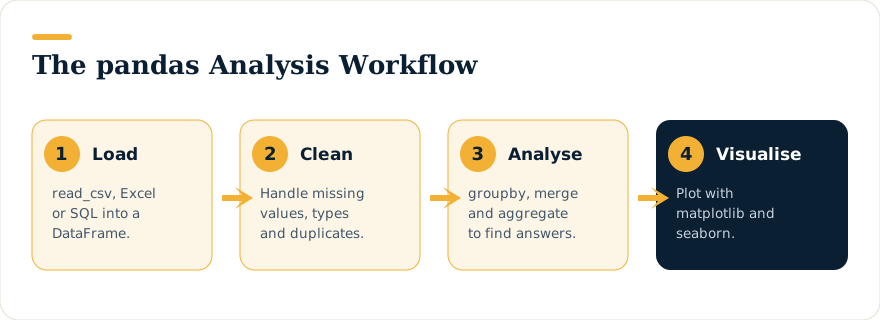
What You Will Learn
- Set up and work productively in
AnacondaandJupyterLab, running and documenting analysis in notebooks. - Load data from CSV and other files into a
pandasDataFrame, and select, slice and assign values with confidence. - Clean and prepare messy datasets — handle missing or wrong values, rename, filter, sort and reshape data so it is ready for analysis.
- Aggregate and summarise data with
groupby(), pivots and summary functions to scale your insight across larger, complex datasets. - Combine and join datasets to bring related information together and answer richer questions.
- Visualise results with
matplotlibandseabornto surface patterns, trends and outliers. - Apply statistical techniques in Python — correlation, linear regression, time-series and categorical analysis — to back conclusions with evidence.
- Pull it all together in an end-to-end analysis project on a real dataset.
Who Should Attend
This course suits anyone who needs to analyse large volumes of data quickly and uncover insights that are not obvious at a glance.
- Analysts and executives who want to go deeper than spreadsheets allow.
- Professionals preparing and interpreting research or business data.
- Aspiring data scientists building the foundations for machine learning and AI work.
- Anyone who wants to use Python specifically for data analysis with
pandas,NumPyandSciPy.
Prerequisites
- Basic familiarity with Python programming is required — you should be comfortable with variables, loops and simple functions.
- No prior data-analysis experience is needed; the analytics workflow is taught from the ground up.
- If you are new to Python, we recommend attending our Python Programming course for beginners first.
Course Outline
Day 1 — Python, Pandas & Data Preparation
- Getting set up — install and navigate
AnacondaandJupyterLab, manage environments, run code in notebooks and use Markdown to document your work. - Python for analysis — a quick orientation to Python and its standard libraries for data work.
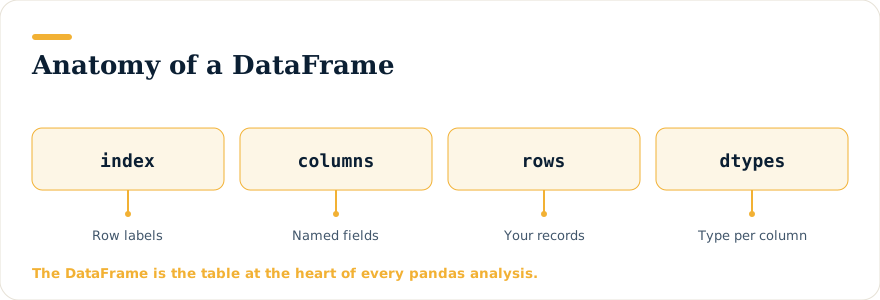
- Introducing pandas — understand
SeriesandDataFramestructures and choose the right one for the job. - Creating and loading data — build
DataFrameobjects and import data from files into JupyterLab. - Accessing data — select specific rows, columns and subsets by name or position.
- Manipulating DataFrames — rename, replace, add and remove rows and columns, filter on conditions and sort your data.
- Data preparation — import and export across files, then clean, sort and filter datasets ready for analysis.
Day 2 — Summarising, Visualising & Analysing
- Summary statistics — calculate descriptive measures and extract early insight from your data.
- Aggregation — group and pivot data with
pandasto roll up insight across categories. - Visualisation — create informative charts with
matplotlibandseaborn. - Statistical analysis — apply statistical techniques to test ideas against the data.
- Correlation & regression — measure relationships and fit simple linear regression in Python.
- Time-series & categorical data — techniques for analysing trends over time and categorical variables.
- Analysis project — apply the full workflow to a real dataset and interpret your results.
Funding, Trainer & Corporate Runs
This is a WSQ-funded, SkillsFuture-eligible programme for those who qualify, and NTUC members may use UTAP to offset part of the remaining fee. Training is led by Intellisoft’s founder and Master Trainer, Vinai Prakash. Corporate runs for teams of 15 or more can be arranged at your premises or ours.
Course Fees After Funding
Full course fee: S$980 before GST and funding · Course reference TGS-2023018660
| Who | SSG grant | You pay (incl. GST) |
|---|---|---|
| Singapore Citizens aged 40+ · SME-sponsored Citizens and PRs | 70% | S$382.20 |
| Singapore Citizens aged 21–39 · PRs (individual or MNC-sponsored) | 50% | S$578.20 |
| Foreigners and other pass holders | — | S$1,068.20 |
Singapore Citizens 25+ can use SkillsFuture Credit on the balance, NTUC members can claim UTAP, and companies can use SFEC. GST is charged on the full fee before subsidy. Funding is subject to eligibility and SSG approval.
Upcoming Course Dates
Loading upcoming dates…
Need a different date or a private team run? WhatsApp us or send an enquiry.
Keep Building Your Data Skills
- Python Programming Course in Singapore — Beginner TrainingGo from zero to confident coder in two hands-on days — learn Python from scratch with hands-on, classroom guidance.
- Introduction to SQLQuery databases directly — the natural partner to Python for working with business data.
- Power BI TrainingTurn your analysis into interactive dashboards your team can explore.